Blips
A blip is a short sound a sprite or item plays when the avatar meets it. Blips makes them: pick a kind, make one, then mutate or tweak it until it sounds right.
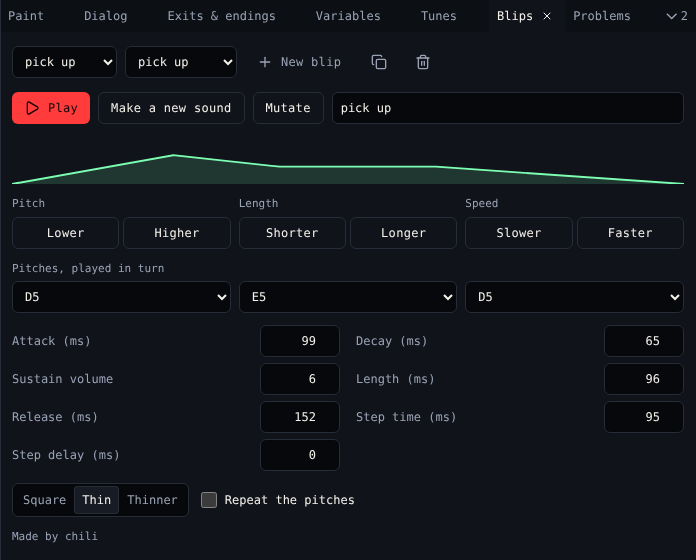
Make one
- Pick a Kind: pick up, greeting, bloop, bleep, magic, meow or random.
- Choose New blip.
- Play it. Not quite? Make a new sound makes another of the same kind; Mutate changes it a little.
- Give it a name.
- Pick it in Sound in Paint for a sprite or item.
Tweak it
| Control | Does |
|---|---|
| Pitch: Lower, Higher | Moves every pitch down or up |
| Length: Shorter, Longer | Shortens or lengthens it |
| Speed: Slower, Faster | Plays the pitches slower or faster |
| Pitches, played in turn | Up to three notes, played one after another |
| Attack, Decay, Length, Release (ms) | How the volume rises and falls. The shape above shows it. |
| Sustain volume | How loud it holds, 0 to 15 |
| Step time, Step delay (ms) | How long each pitch plays, and the gap before the next |
| Tone | Square, Thin or Thinner |
| Repeat the pitches | Keeps cycling through the pitches for the whole length |
The bottom says who makes the sound, like Made by chili.
Related
- Tunes can play blips on a beat
- Dialog's Play a blip (
{blip "1"})