2. Avatar and sprites
Sprites are characters. One sprite is special: the avatar, the one the player moves. In this step you draw the avatar and the gardener.
Draw the avatar
- Open Library, choose Sprites and pick avatar.
- Draw your hero in Paint. Sprites and items use the third palette colour, so the avatar is chili red.
The avatar cannot be deleted: every game needs one.
Place the avatar
With the avatar picked, Room says Click to move avatar. Click the cell where the game starts. In Chili Garden that is 8,12, near the bottom.
Game confirms it: Starts in garden at 8,12.
Turn the cat into the gardener
- In Library, pick cat. Rename it
gardenerin Paint. - Draw the gardener.
- Tick Animated. A second frame appears: choose Frame 2 and change a few pixels, like the feet. The small preview next to the frames shows how it moves in the game.
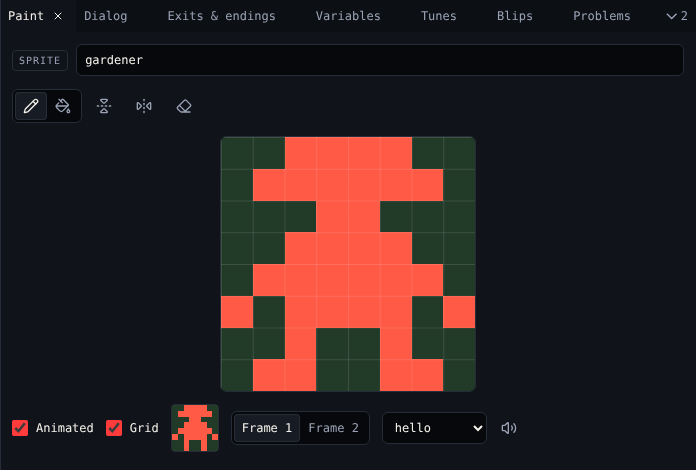
Give the gardener a sound
Sprites and items can play a blip, a short sound, when the avatar meets them.
- Under the drawing, pick a blip in Sound. The speaker button plays it.
- To make your own, open Blips, choose a kind like greeting and New blip. Chili Garden uses one called
hello.
Place the gardener
With the gardener picked, Room says Click to move gardener. A sprite stands in one place, so clicking moves it. Put him in the middle of the garden at 8,6.
Check it
Play the game and walk into the gardener. He still says I'm a cat: you fix that in 4. Dialog.
| Kind | Can talk | Picked up | Blocks the avatar | How many in a room |
|---|---|---|---|---|
| Tile | No | No | Only when Wall is on | Any |
| Sprite | Yes | No | Yes | One place per sprite |
| Item | Yes, when picked up | Yes | No | Any |
Next
3. Items: the chilis to find.