title: Dialog description: The Dialog tool. Write what sprites and items say as text with an Insert menu, or build it from blocks: choices, conditions and actions.
Dialog
Dialog is what sprites and items say, and the text of endings and exits. Pick a sprite or item and Dialog shows its dialog. Write it as Text, or build it from Blocks.
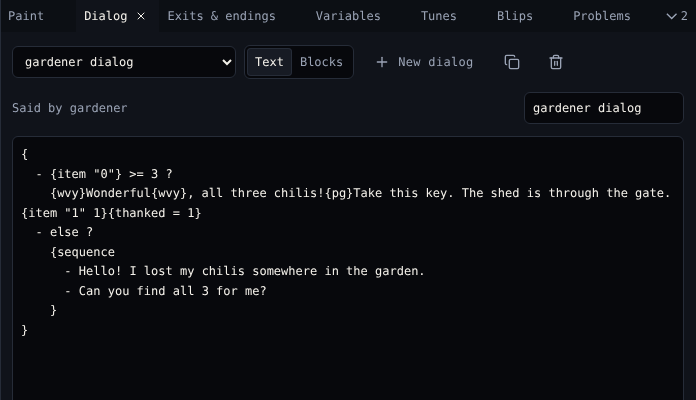
Pick a dialog
| You picked | Dialog shows |
|---|---|
| A sprite or item with dialog | Its dialog, with Said by … |
| A sprite or item without dialog | Write what … says, which makes one |
| A tile | Tiles do not talk |
| Nothing | The dialog menu: pick any dialog |
| Control | Does |
|---|---|
| Dialog menu | Opens any dialog in the game, including exit and ending text |
| Text, Blocks | Switches view. Both edit the same dialog. |
| New dialog | Makes an empty dialog nobody says yet |
| Copy dialog | Copies this dialog |
| Delete dialog | Deletes it after asking. Whoever said it has nothing to say. |
| Name | The dialog's name in menus |
Text view
Type the text. Long text is split into pages of three lines; the player presses a button to go on.
Insert… puts a ready-made piece of script at the cursor, or around the words you selected:
| Insert | Writes |
|---|---|
| Wavy text, Shaky text, Rainbow text | {wvy}…{wvy}, {shk}…{shk}, {rbw}…{rbw} |
| New page | {pg} |
| Say lines in order | {sequence …}: each line once, then the last one again |
| Say lines round and round | {cycle …}: the lines in turn, forever |
| Say lines in any order | {shuffle …}: a random line each time |
| If a variable is… | A branch on a variable |
| If the player has an item | A branch on an item count |
| Change a variable, Show a variable | {a = a + 1}, {say a} |
| Go to a room | {exit "0" 8 8} |
| End the game | {end} |
| …and every block below |
The full language is in Dialog scripting.
Blocks view
Each part of the dialog is a block with its own fields. Move blocks with the arrows, remove them with ×, and add more from the Add a block menu. Choice blocks have Add option, and If blocks Add a condition and Add otherwise.
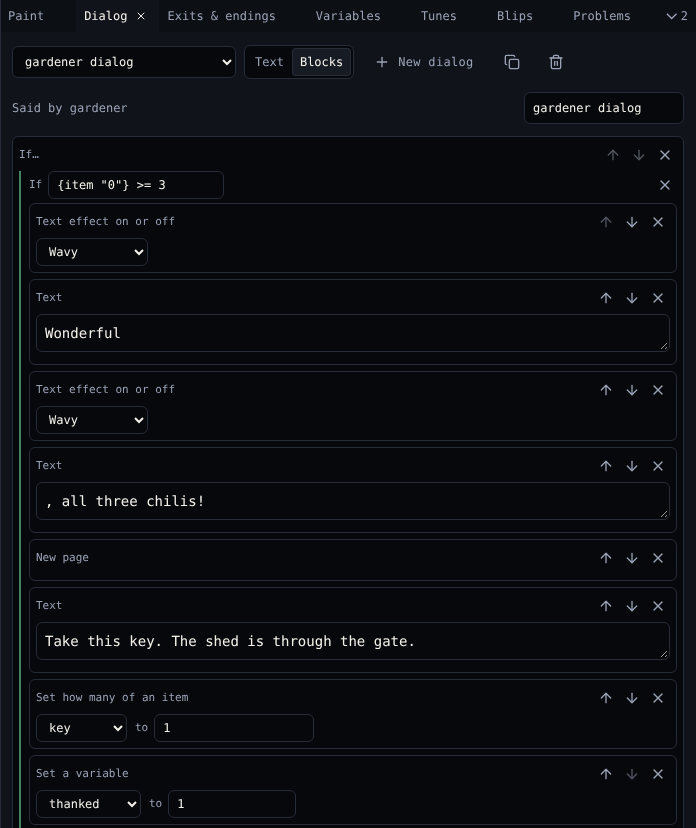
| Group | Blocks |
|---|---|
| Dialog | Text, New page, Wavy, Shaky, Rainbow, Colour 1, Colour 2 and Colour 3 text, Draw a tile, Draw a sprite, Draw an item |
| Choices | Say lines in order, Say lines round and round, Say lines in any order, If a variable is…, If the player has an item |
| Exits and endings | Go to a room, End the game, Lock or unlock the exit |
| Room and sound | Change the palette, Change the avatar, Play a blip, Play a tune |
| Items and variables | Set how many of an item, One more of an item, One less of an item, Show how many of an item, Set a variable, Change a variable, Show a variable |
Fields that name something, like a room or an item, are menus of names, so you never type an id.
Problems in a dialog
When a script refers to something that is not there, like a room you deleted or a variable nothing sets, Dialog lists the problem in amber under the text. See Problems.
Related
- 4. Dialog in the tutorial
- Dialog scripting
- Exits & endings for exit and ending text