Projects
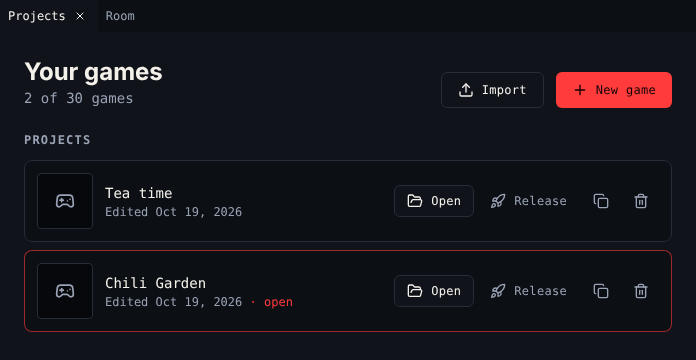
Projects lists your games. It is the first thing you see when you open the creator.
The list
The heading shows how many games you keep, out of 30. Each row has the game's cover, title and when you last edited it. The game you have open says open.
Below Projects, a Released section lists the games you released. Buyers keep the version you released. Edits stay with you until you publish an update.
Buttons
| Button | Where | Does |
|---|---|---|
| New game | Top | Starts a game from the default Bitsy game: a room, the avatar, a cat, tea, a key, three tunes and two blips |
| Import | Top | Makes a new game from a .bitsy file or a web page exported from the Bitsy editor (.bitsy, .txt, .html) |
| Open | Each row | Opens the game in every tool |
| Release | Project rows | Turns the project into a game you can sell. Asks first. |
| Duplicate | Project rows | Copies the project. The copy is a new project. |
| Delete | Project rows | Deletes the project for good. Asks first: Keep it or Delete for good. |
| Publish update | Released rows | Sends your edits to players as the next release. Asks first. |
| Game page | Released rows | Opens the game's page on the platform |
Release a game
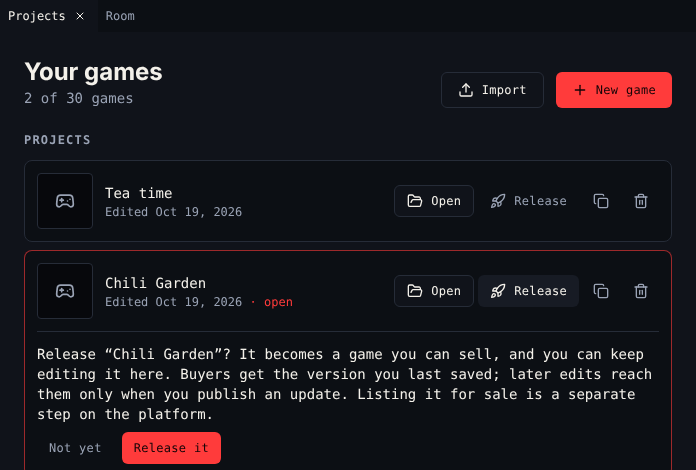
- Choose Release on the project, then Release it.
- The game moves to Released. On the platform it is on the My games shelf of your Library.
- To sell it, list it on the marketplace from your Library. See List a game for sale.
Buyers get the version you last saved before releasing. Releasing needs a verified email address.
Publish an update
You can keep editing a released game. While your edits are not published, the top bar says unpublished changes next to the release number.
Choose Publish update on the game and Publish it. Buyers, the platform's Play page and devices get the new version from then on.
Limits
| Limit | Value |
|---|---|
| Games per account, released ones included | 30 |
| Size of one game | 1.5 MB |
When you reach 30, New game, Import and Duplicate are off. Delete a project to make room.
Not signed in
Without an account, Projects says Not signed in: games are saved in this browser only. Release is not there. Sign in on Chili Platform to keep games on your account.
Related
- Open the creator
- 7. Test and release
- Download for a copy of your game