Tunes
A tune is music a room plays while the avatar is in it. Tunes writes it on a staff, one bar at a time, with two parts: a melody and a harmony.
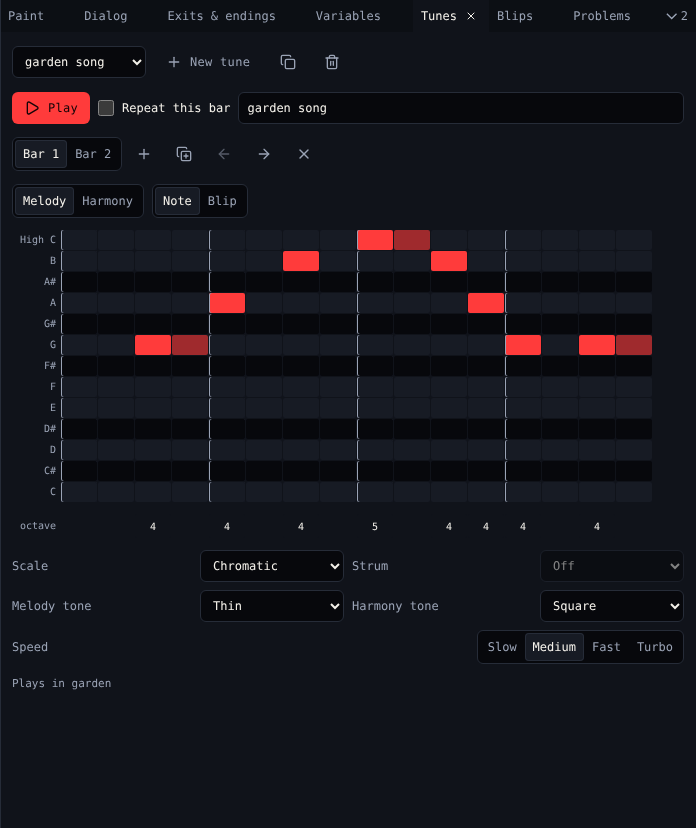
Tunes
| Control | Does |
|---|---|
| Tune menu | Picks a tune |
| New tune | Adds an empty tune |
| Copy tune | Copies it |
| Delete tune | Deletes it after asking. Rooms that played it go quiet. |
| Play | Plays the tune, with a line showing the beat. Press again to stop. |
| Repeat this bar | Plays only this bar, over and over |
| Name | The tune's name in menus |
A tune does nothing until a room plays it: pick it in Music in Room. The bottom of Tunes says which rooms play it.
Bars
A bar is 16 beats. Bar 1, Bar 2 and so on pick a bar.
| Button | Does |
|---|---|
| Add bar (+) | Adds an empty bar at the end |
| Copy bar to the end | Copies this bar after the last one |
| Move bar left, Move bar right | Moves this bar |
| Remove bar (×) | Removes this bar |
Write notes
- Choose the part: Melody or Harmony.
- Click a cell on the staff: the row is the note, the column the beat. You hear the note.
- Drag right to make the note longer. Click a note to take it away.
- Click the octave number under a note to move it up an octave.
Pen: Blip puts a blip on the beat instead of a note: pick which one next to it.
Sound
| Control | Choices |
|---|---|
| Scale | Major (five cheerful notes), Minor (five gloomy notes), Full major, Full minor, Chromatic (every note). The staff shows only the scale's notes. |
| Strum | Off, Chord up, Chord down, Small interval, Big interval. With a strum, the harmony plays a chord from one note per bar. Needs a scale. |
| Melody tone, Harmony tone | Square, Thin or Thinner |
| Speed | Slow, Medium, Fast, Turbo |
Related
- Blips
- Dialog's Play a tune (
{tune "1"}) changes the music while the game runs