Variables
A variable is a number or a word that dialog can read and change while the game runs. Use one to remember anything that is not an item: whether you met someone, a score, a choice.
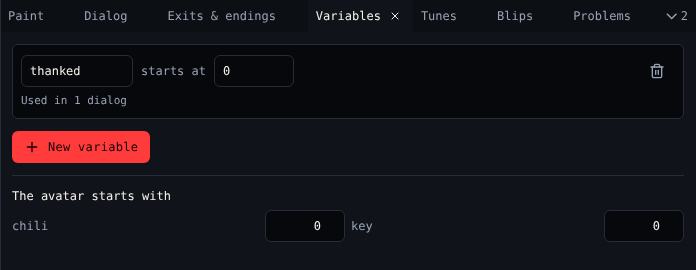
Variables
| Control | Does |
|---|---|
| Name | The variable's name. Dialog uses it, like {say thanked}. |
| starts at | The value when the game starts: a number like 0, or a word |
| Used in … | How many dialogs use it, or Not used yet |
| Delete | Deletes the variable |
| New variable | Adds one |
The avatar starts with
One number per item: how many of it the avatar carries at the start. Most games start with 0 of everything.
Use them in dialog
| Block | Script |
|---|---|
| Set a variable | {thanked = 1} |
| Change a variable | {score = score + 10} |
| Show a variable | {say score} |
| If a variable is… | { - thanked == 1 ? … - else ? … } |
See Dialog scripting for every operator.
Watch them
While the game plays, Play shows every variable and item count live under the game screen.
Related
- 6. Variables in the tutorial