Play
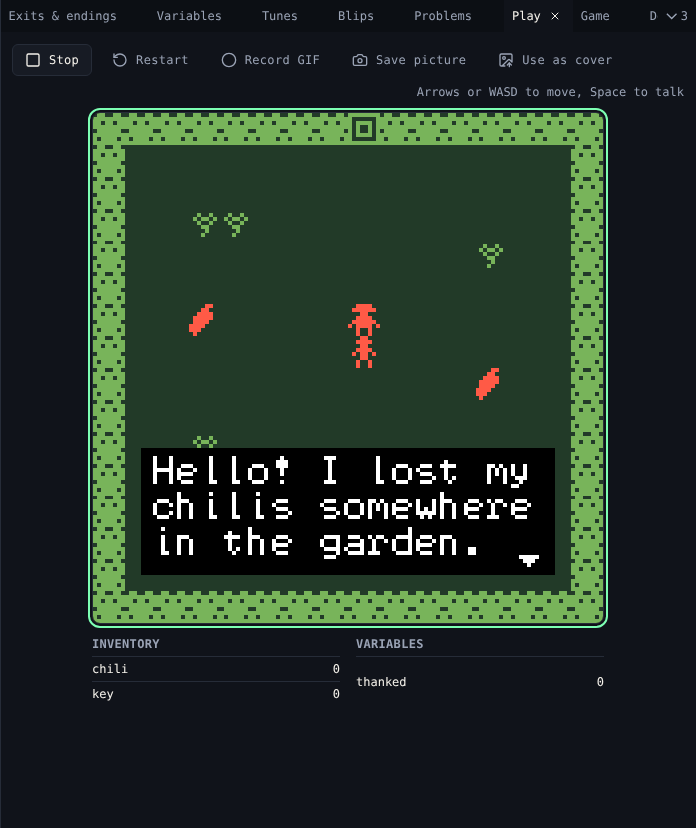
Play runs your game as it is now, with citsy, the same engine that plays it on Chili Platform and on VGC Zero.
Play
Choose Play game. Click the game screen if keys do not reach it.
| Action | Keyboard | Phone |
|---|---|---|
| Walk | Arrow keys or W A S D | On-screen Up, Down, Left, Right |
| Talk, next page, start | Space, Enter, Z or X | Ok, or tap the screen |
| Button | Does |
|---|---|
| Stop | Stops the game |
| Restart | Starts again from the title |
The game does not change while it plays. Edit, then Restart to see the change.
Inventory and variables
Under the screen, two tables show the running game:
- Inventory: how many of each item the avatar carries.
- Variables: every variable's value.
They update as you play, so you can see a dialog change a variable or give an item.
Pictures and GIFs
| Button | Does |
|---|---|
| Record GIF | Records up to 30 seconds of play. Stop recording downloads it, at 256×256 pixels. |
| Save picture | Downloads the screen as a PNG, 512×512 pixels |
| Use as cover | Makes the screen your game's cover on Chili Platform |
Related
- Problems before you play
- 7. Test and release
- Differences from Bitsy: how citsy plays games