Exits & endings
An exit is a cell that takes the avatar to another room, or another place in the same room. An ending is a cell that shows some text and ends the game. Exits & endings lists them for the room in front and sets them up.
Add one
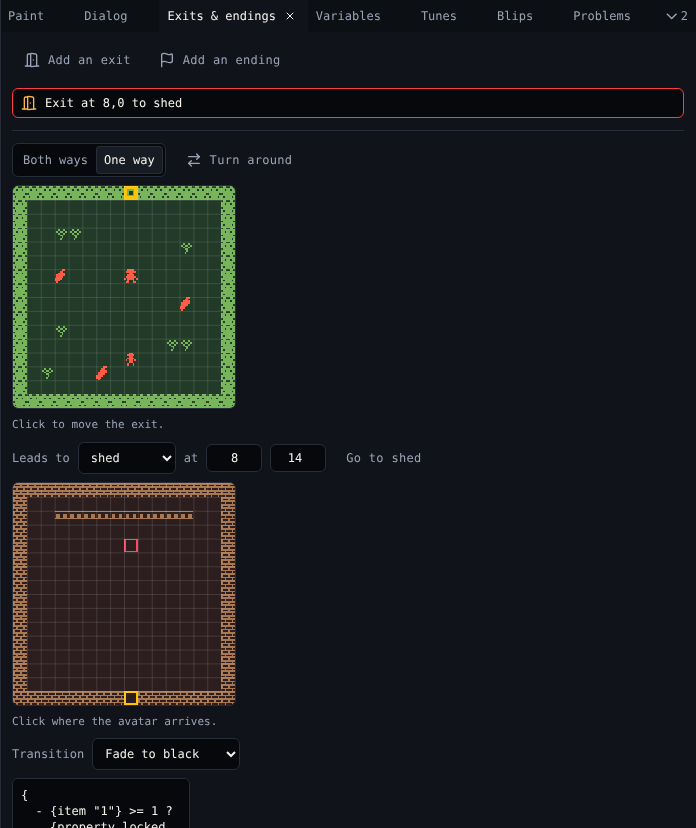
Choose Add an exit or Add an ending here, or the Exit (X) or Ending (N) tool in Room. Then click a cell in Room. The list shows every exit and ending in the room, like Exit at 8,0 to shed. Click one to pick it.
Set up an exit
| Control | Does |
|---|---|
| Both ways, One way | Both ways keeps a matching exit back from the destination; One way removes it |
| Turn around | For a one-way exit: makes it lead from the destination to this cell instead |
| Map of this room | Click to move the exit |
| Leads to | The destination room |
| at x, y | Where the avatar arrives. Or click the map of the destination. |
| Go to … | Shows the destination room in Room |
| Transition | The effect on the way: None, Fade to white, Fade to black, Wave, Tunnel, Slide up, Slide down, Slide left, Slide right |
| Way back | The transition of the exit back, for both-way exits |
| Remove exit | Deletes it (and its way back), after asking |
Narration and locks
An exit can run dialog when the avatar goes through.
| Button | Writes |
|---|---|
| Add narration | Plain text: You walk through the doorway |
| Add a lock | A script that opens the exit only for a player with the key: the item called key, or else the first item. Needs at least one item. |
The lock script:
{
  - {item "1"} >= 1 ?
    {property locked false}
    The key opens the door!
  - else ?
    {property locked true}
    The door is locked...
}
{property locked true} keeps the avatar out. Edit the script like any dialog: check a variable instead of an item, or take the key away with {item "1" 0}. Remove exit dialog takes the script off.
Endings
Pick an ending to write its text. The game ends after this text. After the ending, the next button press starts the game again from the title.
Dialog can end the game too, with {end}.
Related
- 5. Exits and endings in the tutorial
- Room
- Dialog scripting